

A Shopify store in 2026 is nothing without maximizing its potential. Let’s imagine being able to design an entirely custom shopping experience personalized for your brand, automate repetitive tasks, and integrate strong third-party applications without even touching a single line of code. Here comes the Shopify API. From handling orders to inventory management, to advanced Shopify checkout customization and Shopify store design, Shopify APIs are the engines that drive innovation, scalability, and efficiency.
You can unlock your Shopify store’s true potential by having a clear understanding of the Shopify API, no matter if you are a developer, Shopify merchant, or non-technical founder.
Why The Shopify API is Essential for Modern E-commerce
Shopify APIs are behind major tasks, such as order placement, payment processing, when a custom checkout loads, mobile applications to pull product data, or when inventory is updated automatically. In 2026, APIs are more relevant than ever before because now merchants look for headless storefronts, omnichannel selling, Shopify AI personalization, subscription-based billing, and global multi-store management.
Shopify’s extensible ecosystem includes public apps, custom applications, embedded apps, mobile commerce frameworks, and enterprise integrations. All these depend on various Shopify API types, including Shopify storefront API, Shopify admin API, Shopify REST API, Shopify Order API, and Shopify checkout API. This makes APIs the infrastructural layer of Shopify development.
Many brands in the USA are investing in Shopify API customization for marketing automation, automated fulfillment, ERP integrations, B2B wholesale workflows, subscription systems, and CRM synchronization.
What is an API, and How Does It Work?
An Application Programming Interface (API) enables two software systems to communicate with each other. Technically, an API is a set of rules enabling apps to request and exchange data with other applications via standard protocols. Typically, APIs work over JSON data format, HTTP or HTTPS, GraphQL or REST architecture.
APIs work in a way that the technical flow is like a client sends a request (requests include authentication credentials such as a Shopify API key.
What is the Shopify API, and How Does It Support Shopify Development in 2026?
Before the Shopify API, let’s understand briefly “ what is Shopify and How does Shopify work?” The answer is that Shopify is a one-stop, cloud-based solution for brands that enables them to build, manage, and customize their online stores without having any programming expertise. It operates by offering a monthly subscription and hosted solution, which has product management tools, website templates, secure payment options, and inventory management.
A collection of programmable interfaces enabling applications, developers, and external systems to interact with Shopify stores, is the Shopify API. Merchants can retrieve store data, automate workflows, and build custom applications with Shopify APIs. They also allow you to customize checkout flows, modify store data, or sync with an enterprise system. The various types of Shopify API help in accessing all major functions from product management to checkout.
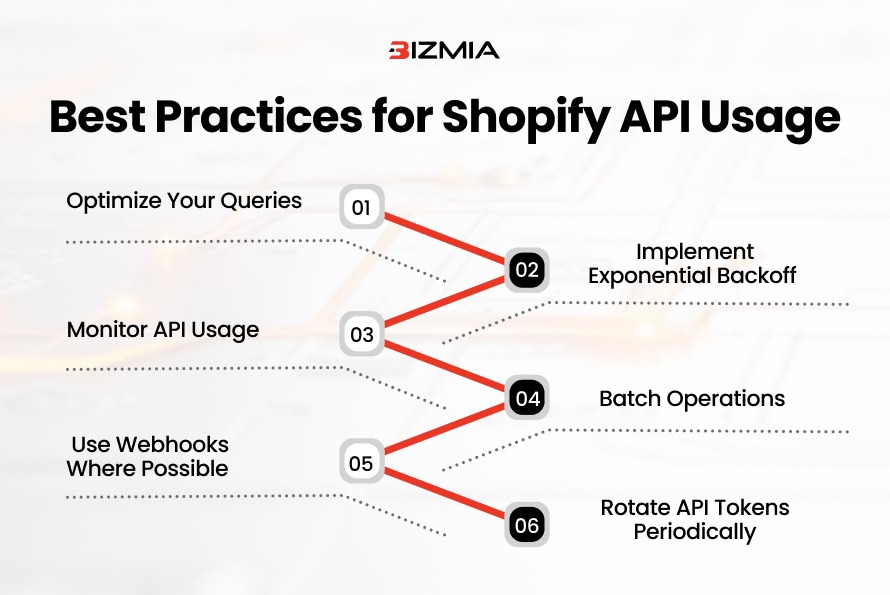
Here’s how you can use Shopify APIs in the best possible way:
Advanced Shopify API Types: A Complete Breakdown
Before getting into details, here’s a quick overview of Shopify API types:
Shopify API Type | Key Usage | Users/Audience | Technology | Best for |
| Manage and store backend data | Developers | GraphQL / REST | Automation |
2. Storefront API | Custom storefronts | Frontend devs | GraphQL | React |
3. Order API | Order lifecycle management | Developers | REST / GraphQL | Fulfillment Automation |
4. Draft Order API | Custom orders | B2B | REST / GraphQL | Wholesale workflows |
5. Checkout API | Checkout customization | Developers | REST / GraphQL | Subscription checkout |
6. Ajax API | Dynamic frontend cart actions | Theme devs | REST / AJAX | Live product suggestions |
7. Partner API | Application ecosystem integration | Developers | REST | Shopify App Store Applications |
Let’s dig into the details of each Shopify API:
Shopify Storefront API
Shopify storefront API is developed for designing headless stores or custom frontends. This type of API focuses on front-end interactions, and it is customer-facing. Key technologies supported by Shopify storefront API include GraphQL, Next.js, React, and Hydrogen. Retailers can trust and avail themselves of Shopify development services from a reliable service provider.
Key Features of Shopify Storefront API
Some key features of the storefront API include:
- Access the collection data and product
- Design and manage checkouts and carts
- Manage sessions and customer accounts.
- Get the content of the storefront programmatically.
Popular Storefront API Use Cases
Practical use cases of the Shopify storefront API are headless e-commerce setups, mobile applications, and a custom Shopify store setup via React.
Here’s a GraphQL query in the storefront API:
{

ProductByHandle(handle: "example-product") {

  title

  variants(first: 5) {

    edges {

      node {

        price

        availableForSale

      }

    }

  }

  images(first: 3) {

    edges {

      node  {

        src

      }

    }

  }

}

}
Shopify Admin API
This Shopify Admin API was built to handle the e-store backend. You can read and write data programmatically with this type of Shopify API. Also, it provides complete control over customers, products, and orders. Admin API has 2 types: GraphQL Admin API and REST Admin API.
Key Features of Shopify Admin API
Some key features of Admin API include:
- Handle clients and orders they place
- Manage inventory levels and locations.
- Update discounts
- Retrieve variants, products, and collections.
Popular Admin API Use Cases
Practical use cases of the Shopify Admin API are syncing store data, building custom reporting dashboards, and automating inventory updates.
Shopify Order API
Shopify Order APIs handle orders and give complete control over the lifecycle.
Key Features of Shopify Order API
Some key features of Order API include:
- Retrieve, design, and update orders.
- Monitor fulfillment status
- Get transaction history
- Access client purchase history
Popular Order API Use Cases
Practical use cases of the Shopify Order API are integrating with warehouse management systems, automating workflows of orders, and synchronizing orders with accounting software.
Shopify Draft Order API
With the Shopify Draft Order API, retailers can customize or create orders programmatically. This type of Shopify API is ideal for wholesale, special pricing scenarios, and B2B.
Key Features of Shopify Draft Order API
Some key features of Shopify Draft Order API include:
- Directly send invoices to customers.
- Design draft orders for clients
- Draft orders for clients and convert drafts to completed orders
Popular Draft Order API Use Cases
Practical use cases of the Shopify Draft Order API are special B2B order flows, sales team-assisted purchases, discounts, and custom promotions.
Shopify Checkout API
Shopify developers can integrate payment workflows and customize checkout experiences with the Shopify Checkout API.
Key Features of Shopify Checkout API
Some key features of the Checkout API include:
- Programmatically add line items to carts.
- Build checkout sessions
- Apply shipping rates and discounts.
- Third-party payment gateway integration
Popular Checkout API Use Cases
Practical use cases of Shopify Checkout APIs are subscription-based billing, custom checkout flows, and multi-step or one-page checkouts for Shopify Plus. Brands can hire Shopify Plus developers to design a smooth checkout workflow.
Shopify Ajax API
This type of Shopify API emphasizes the frontend part, and it is directly embedded in themes.
Key Features of the Ajax storefront API
Some key features of Shopify Ajax API include:
- Dynamically update carts
- Bring product suggestions within no time.
- Remove or add items to the cart, avoiding page reload
Popular Ajax API Use Cases
Practical use cases of Shopify Ajax API are quick add-to-cart buttons, a smooth shopping experience, and product recommendations.
Shopify Partner API
These are built for agencies or developers creating apps for the Shopify ecosystem available on the Shopify app store.
Key Features of Shopify Partner API
Some key features of Partner API include:
- Track transaction history and billing
- Taking care of interactions and app events within Shopify
Popular Partner API Use Cases
Practical use cases of the Shopify Partner API are embedded admin applications, app development, and app performance tracking.
Shopify GraphQL API Vs Shopify REST API
For advanced Shopify development, a crucial decision is to choose between GraphQL and REST APIs. REST uses HTTP methods and URLs and returns fixed data structures that may sometimes have unnecessary information. On the other hand, GraphQL fetches the requested data and avoids under-fetching or over-fetching.
You can pick REST APIs when you have to maintain legacy apps, simple read/write operations, and for quick integrations. Shopify GraphQL APIs are a fit for headless commerce, advanced automation workflows, high-volume stores, and for fetching relational or complex data.
How You Can Access Shopify API: Step-by-Step Explainer
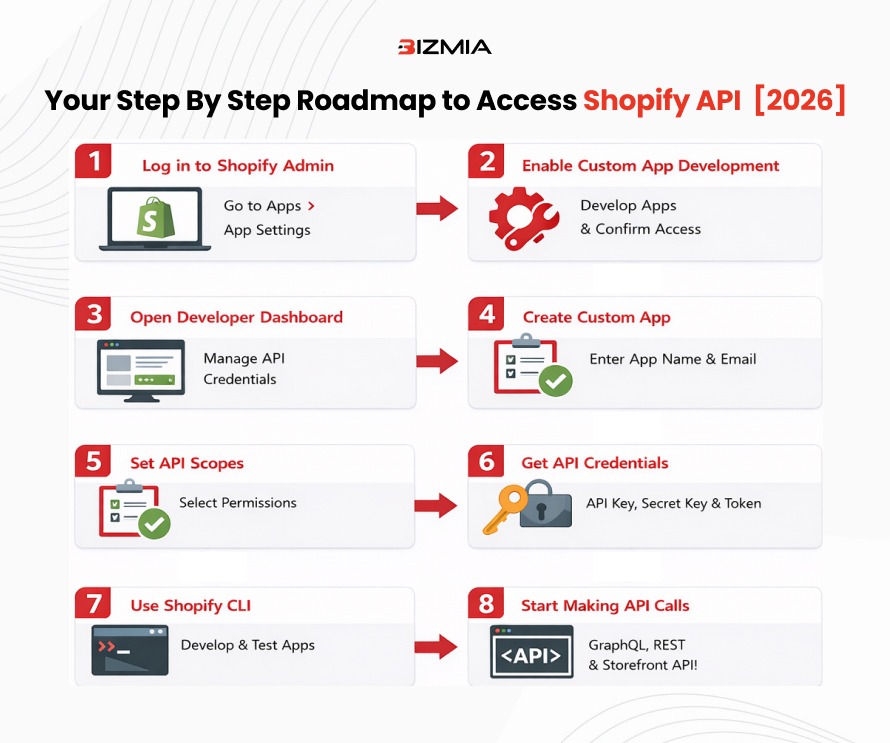
Now you know about all the key Shopify APIs, and you can follow this roadmap to get access to Shopify APIs for your e-store:
1. Logging in to Shopify Admin Panel
You can start by signing up for your Shopify or Shopify Plus admin panel, then navigate to the “Apps” and click “App settings”.

2. Allowing Custom App Development
Now click “Develop Apps” and agree to the prompts for developer access.

3. Accessing the Developer Dashboard
From your admin panel, open the developer dashboard, and there you will see an option for “create a new custom app”.
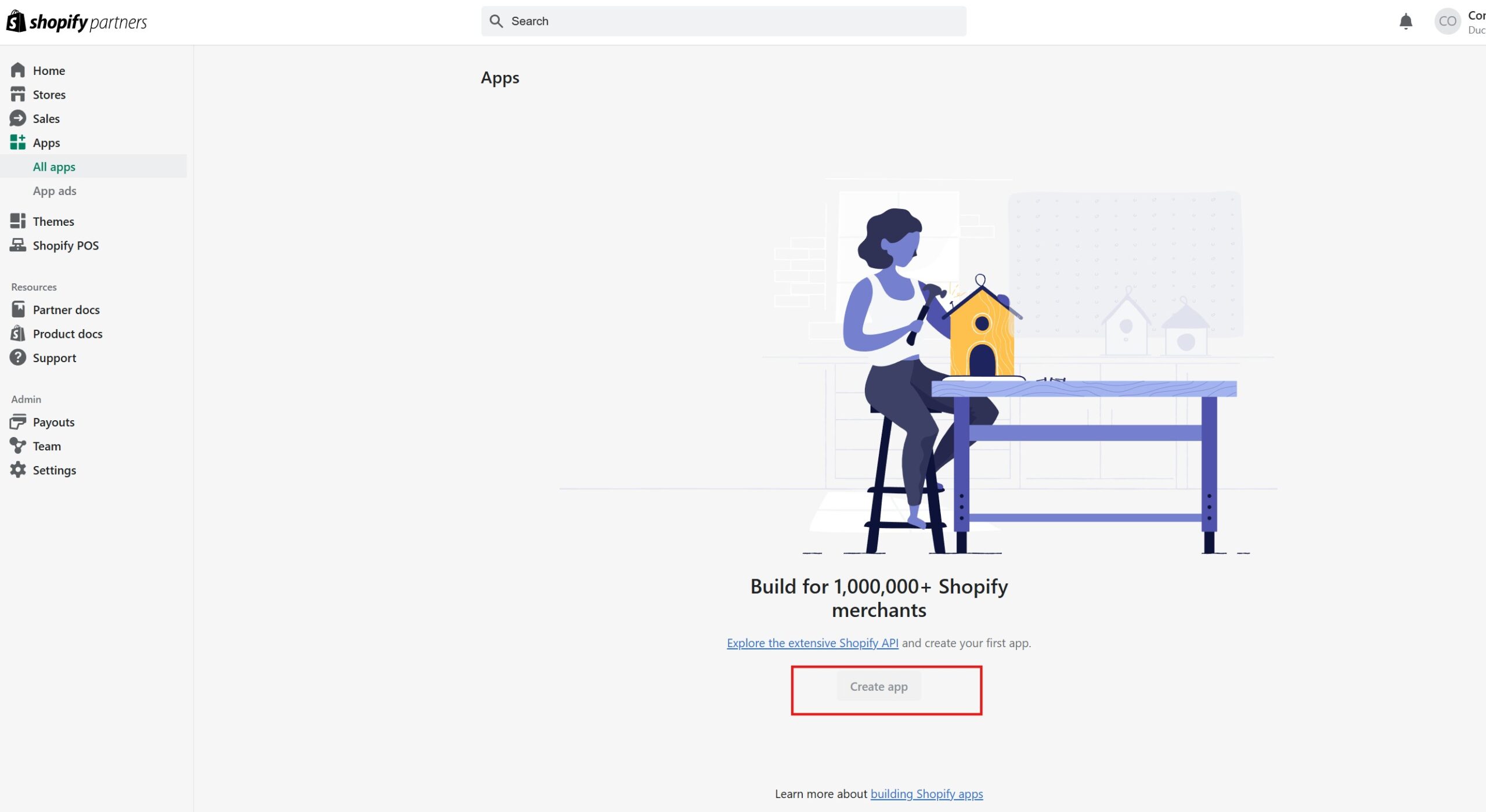
4. Developing a Custom Application
Now click “create app”, enter your app name, give the developer’s email address, and click “Create”.
5. Setting API Scopes
With API scopes, you grant permission for your application to read or write. Navigate to “Access & Optional Scopes” and click “Select scopes,” and then select the necessary permissions for your app.
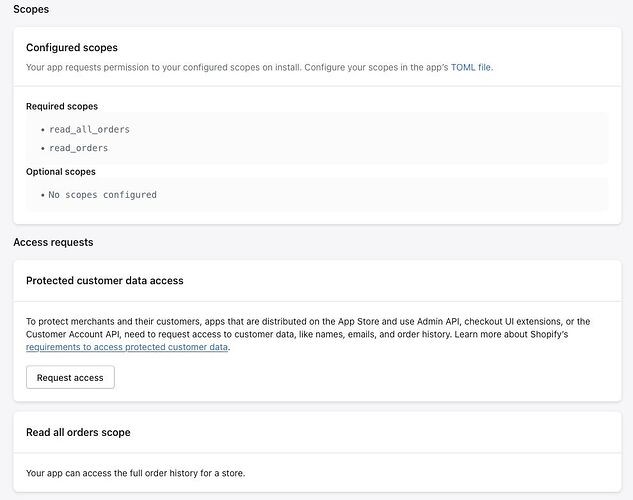
6. Getting API Credentials
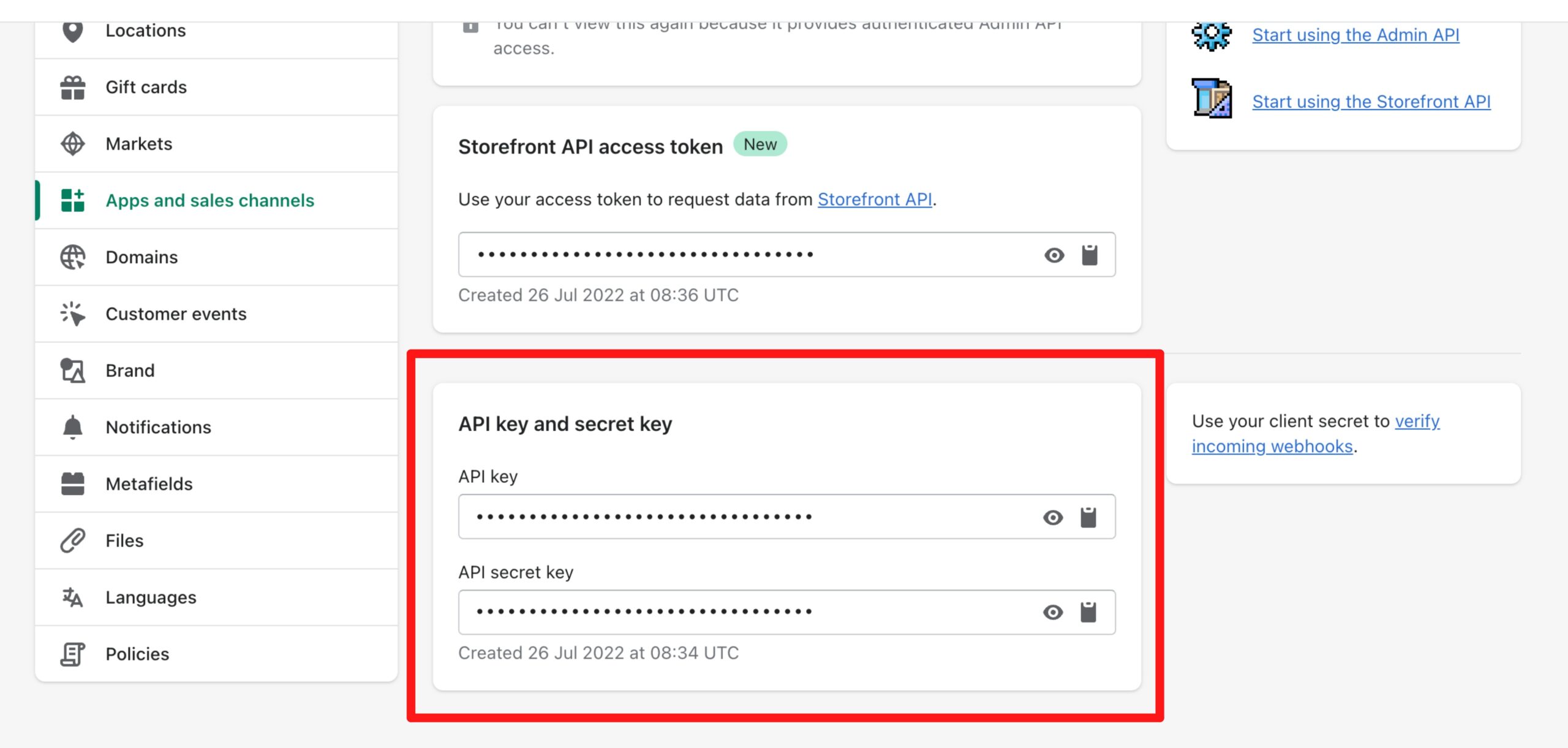
Once you are done with scopes, install the app in the store, and Shopify will give you the API Key, API Secret Key, and Admin API Access Token.
7. Using Shopify CLI for Quick Development
You can use the Command-Line Interface (CLI) to streamline apps and storefront development.

8. Making API Calls
With your App scopes and credentials all set, now you can start interacting with Shopify APIs.
 Here are some quick tips to follow during the process:

Shopify API Rate Limits
To maintain platform stability and limit API calls, Shopify sets rate limits. These rate limits vary by API types. They are helpful in preventing server overload, avoiding throttling, and minimizing failed requests and errors. Additionally, it helps ensure real-time workflows.
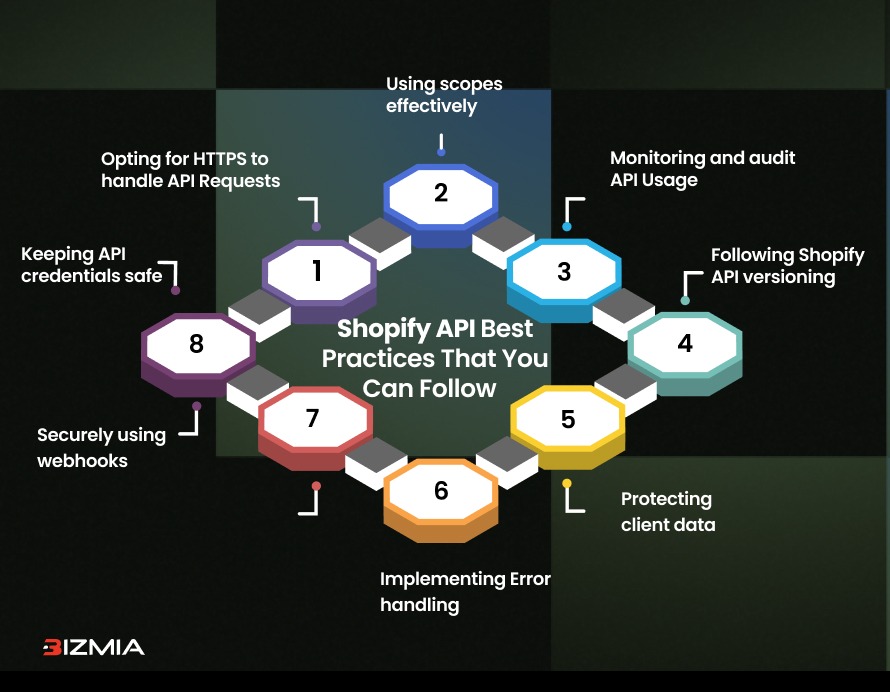
Shopify API Best Practices That You Can Follow
Follow these proven security practices to make your store and client data safe:
- Keeping API credentials safe: Never share your credentials and limit access to trusted professionals only.
- Opting for HTTPS to handle API Requests
- Using Scopes Effectively: Request only the minimum required scopes and avoid requesting global access unless required.
- Monitoring and audit API Usage to prevent abuse
- Following Shopify API versioning to avoid security risks associated with outdated endpoints
- Securely use webhooks and restrict access to a known IP address.
- Protecting client data by complying with data protection regulations like CCPA, PCI DSS, and GDPR
- Companies hire Shopify developers to implement error handling effectively.
Conclusion
It’s a strategic business advantage to master Shopify APIs in 2026. You can develop customized shopping experiences and streamline your store’s workflow by leveraging Storefront, Admin, Order, Checkout, and other Shopify APIs. These APIs are the base for innovation and long-term success. Let’s start learning Shopify APIs today!